You just bought a beautiful personalized storybook for your child, downloaded the file, and sent it off to a print shop, only to get a call saying the file isn't usable. It's more common than you'd think. Many parents assume that any digital file they receive is automatically ready to print, but there's a real difference between a file that looks great on a screen and one that meets the specific technical requirements for professional printing. This guide breaks down exactly what "print-ready" means, why it matters for personalized books, and how to make sure the storybook you order will actually look stunning in print.
Table of Contents
- What does print-ready really mean?
- Key technical requirements for print-ready storybooks
- Choosing the right format and size for your custom storybook
- Why getting the file right matters: Pitfalls, delays, and costs
- Our take: The hidden value of print-ready personalization
- Discover personalized, print-ready storybooks for your child
- Frequently asked questions
Key Takeaways
| Point | Details |
|---|---|
| Print-ready means no edits | A print-ready storybook is fully formatted and can go directly to the printer without further changes. |
| Technical specs matter | Meeting resolution, color mode, bleed, and margin standards avoids delays and ensures quality. |
| Size and format affect experience | Choosing standard trim sizes and spreads delivers immersive stories and reliable printing results. |
| Errors lead to delays | Incorrectly formatted files can add weeks to production and drive up costs. |
| Personalized print-ready books are lasting keepsakes | Getting your custom storybook file right results in a memorable, professionally printed gift. |
What does print-ready really mean?
With an understanding of the confusion surrounding digital files, let's clarify what actually defines a print-ready storybook.
A print-ready storybook is a digital file, typically a PDF, formatted to meet printer specifications for direct production without modifications. That last part is key. "Without modifications" means you don't need to adjust anything before sending it to the printer. It goes in, and a finished book comes out.
This is different from an e-book or a standard digital download. E-books are designed for screens. They're often formatted with flexible layouts, screen-optimized colors, and lower resolution images. Those qualities are great for reading on a tablet but completely wrong for print.
When we talk about making personalized books that will actually hold up as physical keepsakes, the file needs to meet a very specific set of standards. Here's a quick overview of what a print-ready file includes:
- Trim size: The finished dimensions of the printed page
- Bleed area: A small extension of artwork beyond the trim edge so there are no white borders after cutting
- Color mode: CMYK (a color system designed for ink printing, not screens)
- Resolution: 300 DPI (dots per inch) for sharp, clear images
- Embedded fonts: Typefaces baked into the file so they don't shift or disappear
- Flattened transparency: Layers merged to prevent printing errors
- File format: PDF, specifically formatted for print
Each of these elements works together to ensure the book you receive looks exactly like the preview you approved. Skipping even one of them can lead to blurry illustrations, colors that look washed out, or text that gets cut off at the edges.
Good storytelling workflow tips often skip the technical side entirely, which is why so many parents get caught off guard. Understanding the basics of what goes into a print-ready file puts you in a much stronger position when ordering your child's custom book.
Key technical requirements for print-ready storybooks
Now that we've defined "print-ready," let's go deeper into the technical checklist every storybook file must meet.
The key mechanics include 300 DPI resolution at final print size, CMYK color mode, 0.125-inch bleed on all trimmed edges, safety margins of 0.25 to 0.5 inches for text, embedded fonts, and flattened transparencies. These aren't arbitrary rules. They exist because printing is a physical process with real constraints that screen display simply doesn't have.
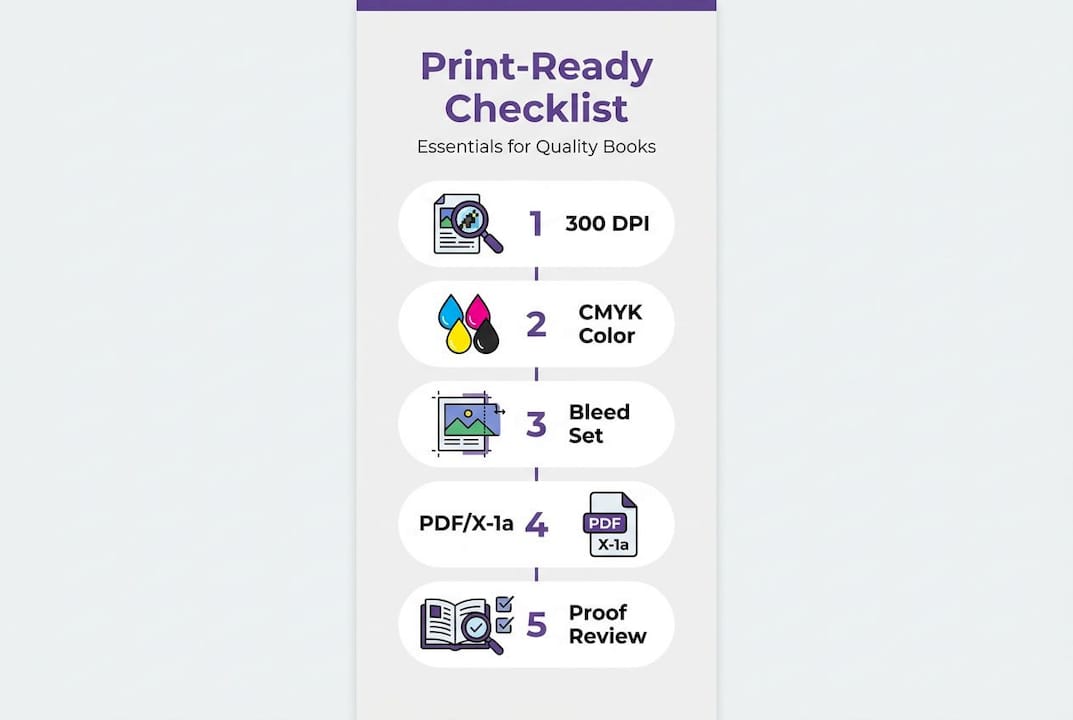
Here's a breakdown of each requirement and why it matters for your child's book:
| Technical element | Standard requirement | Why it matters |
|---|---|---|
| Resolution | 300 DPI | Prevents blurry or pixelated images in print |
| Color mode | CMYK | Ensures accurate ink color reproduction |
| Bleed | 0.125 inch on all sides | Eliminates white borders after trimming |
| Safety margin | 0.25 to 0.5 inch | Keeps text and faces away from cut lines |
| Font embedding | Required | Prevents fonts from substituting or disappearing |
| Transparency | Flattened | Avoids unexpected rendering errors |
| File format | PDF/X-1a or PDF/X-4 | Industry standard for preflight validation |
The PDF/X-1a or PDF/X-4 export format is the industry standard for preflight validation, the process where a printer checks your file before production begins. If your file isn't in one of these formats, it may get flagged, or worse, printed incorrectly without warning.
Resolution is one of the most misunderstood requirements. A file can look perfectly sharp on your laptop screen at 72 DPI (the standard for screen display) and still print as a blurry mess. This is especially damaging in a children's book, where the illustrations are the heart of the experience. If your child's face appears as a fuzzy blob on the page, the whole personal magic of the book falls apart.
Color mode is another common tripping point. Screens use RGB (red, green, blue) light to create color. Printers use CMYK (cyan, magenta, yellow, and black) ink. When you print an RGB file, the printer has to convert it on the fly, which often leads to colors that look darker, duller, or just plain different from what you saw on screen. Converting to CMYK before printing gives you control over exactly how those colors will appear.
Bleed exists because printing and cutting are two separate steps. If your illustration stops exactly at the trim line, even a tiny shift in the cutting process leaves a thin white border. The bleed area gives the cutter a little wiggle room.
Pro Tip: When reviewing your personalized storybook file, zoom into the illustrations at 100% within a PDF viewer. If the images look crisp and clear at that zoom level, that's usually a good indicator the resolution is correct.
For more hands-on guidance, our home printing tips walk through the full setup process step by step. And if you want to stay updated on what makes great personalized books, our personalized kids' books insights covers topics like this regularly.
You can also find helpful guidance on activity book creation that shares relevant formatting principles from a content perspective.
Choosing the right format and size for your custom storybook
With the technical groundwork set, let's examine the choices you have in book format, size, and layout for your personalized storybook.
Common trim sizes for children's storybooks are 8.5x8.5 inches, 8x10 inches, or 8.5x11 inches, with 20 to 32 fully illustrated pages. Each size has its strengths, and the right choice depends on your child's age, how the book will be used, and your printing preferences.
Here's a simple comparison to help you choose:
| Format size | Best for | Key advantage |
|---|---|---|
| 8.5 x 8.5 inches | Young children, lap reading | Square format feels cozy and familiar |
| 8 x 10 inches | Ages 3 to 7, standard gifting | Versatile, fits most home printers |
| 8.5 x 11 inches | Detailed illustrations, older kids | Maximum page real estate for artwork |
Beyond size, the layout approach matters a lot. Spreads, where illustrations cross the gutter between two pages, create deeply immersive visuals that pull kids into the story. But they require careful file setup. If the artwork isn't laid out correctly across the spread, you'll end up with your child's face split right down the spine of the book. Not ideal.
Here's a practical numbered list to think through when selecting your storybook format:
- Consider how the book will be read. Will you hold it together on the couch, or will your child flip through it independently? Smaller square formats tend to work better for younger kids.
- Think about page count. Fewer pages keep costs lower, but 24 to 32 pages give a story enough room to breathe and feel complete.
- Check your printing option. If you plan to print at home, 8x10 or 8.5x11 are safest for standard printers. If you're using a professional print service, any standard trim size works.
- Look at the illustration layout. Single page illustrations are simpler to execute. Full spreads are more dramatic but demand more precision from the book creator.
- Match the format to the age. Board book style is best for babies, soft or standard bound works for toddlers and school-age kids.
Pro Tip: If you're ordering a personalized storybook as a gift, the 8x10 format tends to feel the most "bookstore ready" and photographs well for sharing on social media.
Our personalized children's books are designed with these size and layout considerations built in, so you don't have to guess. We also offer custom baby books in formats sized specifically for the youngest readers.
When choosing children's books, format and fit-for-age are two of the most important factors parents often overlook until they're holding the finished product.
Why getting the file right matters: Pitfalls, delays, and costs
Understanding book formats is important, but the real impact comes from getting your file right. Here's why it matters and how to avoid disappointment.
Incorrect print-ready files can add 2 to 6 weeks to production. Color picture books cost between $1.34 and $8 per copy to print, which significantly affects pricing when errors require reprints. If you're ordering a single personalized copy as a birthday gift, a 6-week delay or a wasted print run is a real problem.
Here are the most common mistakes that lead to those delays:
- Wrong color mode: Submitting an RGB file when CMYK is required causes unexpected color shifts in the final print.
- Missing bleed: The printer either rejects the file or prints it with visible white edges.
- Low-resolution images: Illustrations come out soft or pixelated, especially faces and fine details.
- Fonts not embedded: Text may render in a default font or disappear entirely.
- Text too close to the edges: Words get trimmed off, making the story hard to read or incomplete.
- Non-standard file format: PDF files that aren't PDF/X format may not pass a printer's preflight check.
"Getting the technical details right from the start isn't just about quality. It's about making sure your child's book actually gets printed on time and looks the way you imagined it."
There's also a cost angle that parents sometimes miss. Even if a printer accepts a slightly imperfect file, the result might look good enough on the first few pages and then show color drift or sharpness issues deeper in the book. Reprints add up fast, especially for full-color books.
Professional checks, or better yet, ordering from a service that handles formatting for you, remove most of this risk. DIY formatting can work, but it requires genuine knowledge of print standards, otherwise you're essentially guessing. You can find more context on custom book timelines if you're planning a gift and need to work backwards from a deadline.
The broader impact of thoughtful book publishing goes beyond one copy of one story. Getting these technical details right is what separates a book your child will treasure for years from one that ends up forgotten in a drawer.
Our take: The hidden value of print-ready personalization
Most conversations about personalized storybooks focus on the fun stuff: the child's name in the title, their face on the hero, their favorite color on the dragon's wings. That's the emotional heart of it, and it's genuinely wonderful. But we've seen enough cases to know that the magic of a personalized book only lands fully when the physical copy actually looks as good as the digital preview.
Here's what we believe, based on experience: a book that features your child's likeness in beautifully crisp, accurate illustrations becomes a keepsake. A book where the colors are muddy, the face is blurry, or the text gets cut off at the edges? That just becomes clutter.
Many platforms promise "fully personalized" books, but not all of them handle the print side with the same care they give to the story creation. Some use template-based systems with decent previews that look great on screen but were never properly configured for print. The result is a gap between what you expected and what arrives in the mail.
We think the difference between personalized and template books isn't just about creative depth. It's also about technical execution. A truly one-of-one book needs both: a story and illustrations crafted specifically for your child, and a file that's been prepared to professional print standards so that story can actually come to life on paper.
Print-ready personalization is where imagination meets reality. Don't settle for a file that's good enough for a screen when your child deserves a book that can sit on a shelf for years.
Discover personalized, print-ready storybooks for your child
If you're ready to experience the real difference of a print-ready storybook, here's how to start your own adventure.
At Adventures Of, every book is created with professional print standards built in from the start. You upload a photo, share your child's details and interests, and our AI generates an original story with custom illustrations that actually look like your child. The file you receive is formatted and ready to print.
You don't need to worry about DPI, bleed settings, or color modes. It's all handled for you. Browse our full collection of personalized children's books or explore our custom baby books for the youngest readers in your family. You can also explore our storybook library to see the range of stories available. The whole process takes about five minutes, and you'll have a print-ready file you can hold in your hands within the day.
Frequently asked questions
What is the difference between a digital storybook and a print-ready storybook?
A digital storybook is formatted for screens, while a print-ready storybook meets professional printer specs for direct, high-quality physical printing without any extra preparation.
Can I print any children's book file at home?
Not all files are suitable. Only print-ready PDFs with proper 300 DPI resolution, CMYK color mode, bleed, safety margins, and embedded fonts will produce sharp, professional-looking results at home or at a print shop.
How long does it take to make a print-ready personalized storybook?
If files are correctly prepared, turnaround can be very quick. However, incorrect files can add 2 to 6 weeks to production, which is why getting the format right from the start matters so much.
Are there standard sizes for print-ready children's storybooks?
Yes. The most popular sizes are 8.5x8.5 inches, 8x10 inches, and 8.5x11 inches, with most personalized picture books running between 20 and 32 fully illustrated pages.
What mistakes should parents avoid when ordering a personalized book?
Make sure the file follows proper print specs, and keep key elements in safe zones well away from page edges to avoid cropping or color surprises in the finished book.
Recommended
- How to Make a Personalized Children's Book (Without Losing a Saturday) | Adventures Of
- Adventures Of | Personalized Children's Storybooks
- Personalized Children's Books — Starring Your Kid | Adventures Of
- Custom Baby Books — First Adventure Starring Your Little One | Adventures Of
- How to choose children's books: a parent's essential guide